Master Your Digital Business with the Ultimate Canva Planner
Running an online business often feels like juggling while riding a unicycle. You have content calendars, financial spreadsheets, and client deadlines all competing for your attention. If you are tired of toggling between ten different apps just to stay organized, the Digital Online Business Planner Canva is the solution you have been waiting for. This comprehensive system brings structure to the chaos, offering a visually cohesive way to manage every aspect of your brand strategy without needing a design degree to use it.
Unlike static PDF planners of the past, this resource leverages the power of Canva. Because it is built specifically for the platform, you get the flexibility of modern digital tools combined with the tactile satisfaction of a traditional planner. Whether you are a seasoned entrepreneur or just starting your journey as a content creator, this planner adapts to your workflow, not the other way around.
A Visual System Built for Creatives
The visual identity of this planner is intentional. It moves away from cluttered layouts and focuses on a clean, minimalist aesthetic that reduces cognitive load. When you open the document, you are greeted by a harmonious color palette and clear typography that prioritizes readability. The design uses a sans serif font style that feels modern and approachable, ensuring that your data stands out without overwhelming the eye. This is not just a collection of pages; it is a cohesive design asset that reflects the professionalism you want in your business.
Within the Canva environment, you have total control over the brand identity elements. If the default style does not match your existing aesthetic, you can easily swap colors, adjust layouts, and change the typeface to match your logo design and brand guidelines. This level of customization ensures that the planner feels like a natural extension of your business, rather than a generic tool you downloaded off the internet.
Practical Organization for Every Aspect of Your Business
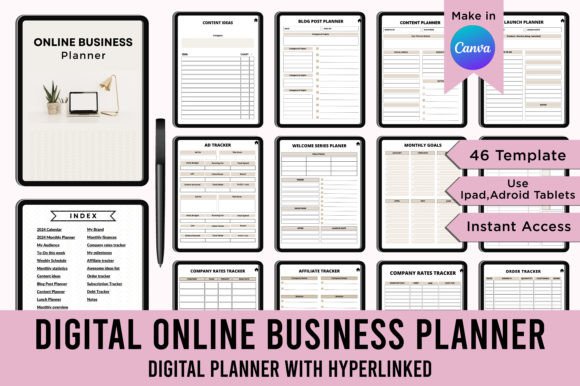
The true value of this system lies in its depth. You are not just getting a simple calendar. The Digital Online Business Planner Canva includes 46 different templates designed to cover every operational need. From high-level strategy to daily execution, every section is accounted for.
Here is a look at the specific areas this planner helps you manage:
- Strategic Planning: Use the "My Brand" and "My Audience" pages to define who you are talking to. The "Monthly Overview" and "Monthly Goals" sections allow you to set the tone for the month ahead.
- Content Creation: The "Blog Post Planner," "Content Planner," and "Pinterest Pin Tracker" are essential for anyone building an audience online. The "Content Ideas" list ensures you never face writer's block again.
- Financial Tracking: Keep your money organized with "Monthly Finances," "Company Rates Tracker," and "AD Tracker." Understanding your cash flow is critical for growth.
- Operational Logistics: Manage the nuts and bolts of your business with the "Order Tracker," "Subscription Tracker," and "Welcome Series Planner."
For those who rely on affiliate marketing or digital products, specific templates like the "Affiliate Tracker" and "Freebie Planner" provide dedicated space to monitor performance. The "Lunch Planner" might seem minor, but for busy entrepreneurs, pre-planning meals can save hours of mental energy during the workweek.
Seamless Integration and High-Quality Output
One of the biggest frustrations with digital planning is file compatibility. This product eliminates that issue by providing high-quality Print-ready PDF Files, JPEG files, and PNG files. The print dimensions are set to the standard 8.5x11 inches at 300 DPI, ensuring that if you prefer a physical copy, the print quality is crisp and professional.
However, the digital workflow is where this planner shines. By using the editable Canva links, you can access your planner from any device. You can update your to-do list on your phone while waiting for coffee, then switch to your desktop later to review your weekly schedule.
Important Note: To ensure you never lose your original templates, follow this specific workflow. When you receive the link, go to your Canva home. Before you start typing, make a copy of the document in your account. Work exclusively on that copy. This preserves the master file, allowing you to restart a fresh planner for a new month or year without repurchasing the asset.
Who Benefits from This System?
This planner is versatile enough for a wide range of users. If you are a blogger, the editorial calendar and blog post planner will streamline your publishing schedule. Marketers will appreciate the ad tracker and social media scheduling pages. Crafters and hobbyists can use the product idea and order trackers to manage their side hustles. Even if you are a publisher or designer, the notes sections and milestone trackers help manage client projects effectively.
The inclusion of a "Weekly Journal" and "Journal" pages adds a layer of mindfulness to your routine. Business planning is not just about logistics; it is also about mental clarity. Reflecting on your week helps you identify what worked and what needs adjustment.
Maximizing Your Workflow
To get the most out of the Digital Online Business Planner Canva, consistency is key. Set aside time every Sunday to fill out your "Weekly Schedule" and "To-Do this week" lists. Use the "Index (Hyperlinked)" to navigate quickly between sections, saving you from endless scrolling.
Think of this planner not just as a notebook, but as a command center. By centralizing your statistics, ideas, and schedules in one place, you create a holistic view of your business. You can spot trends in your "Monthly Statistics" that inform the decisions you make in your "Product Idea" stage. This interconnectedness is what separates a chaotic business from a scalable one.
With 46 templates at your disposal, you have a structured framework that supports growth. It is a practical investment in your productivity, giving you the clarity needed to focus on what you do best: creating and selling. Stop letting administrative tasks dictate your day. Take control with a system designed for the modern digital entrepreneur.