Canva Book Template for KDP 6x9 E-Book: A Clean Slate for Your Digital Publishing
Getting a manuscript ready for Kindle Direct Publishing is often where the excitement of writing meets the frustration of formatting. You have the words, you have the story or the expertise, but wrestling with margins, gutters, and consistent styling in a word processor can feel like a losing battle. This is where a dedicated Canva Book Template for KDP 6x9 E-Book shifts from a nice-to-have to a genuine workflow essential. It’s not about cutting corners; it’s about starting with a professional foundation so you can focus on your content, not your document settings.
The Anatomy of a Professional Ebook Template
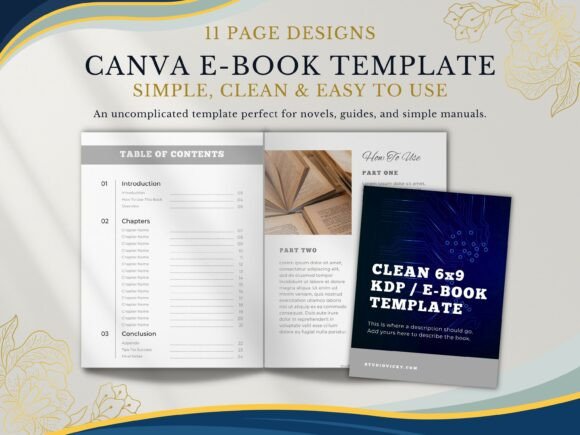
A good template does more than just look pretty. It provides a logical structure that guides both you, the creator, and your future reader. This specific 11-page package is built around that principle. Think of it as the architectural blueprint for your book. It includes the non-negotiable front matter—the Title Page that makes that first impression count and the Introduction that sets the stage. Then, it moves into the practical heart of the reader's journey with two distinct "How To Use This Book" layouts. This isn't filler; it's a critical piece of user experience design for your content, helping readers navigate your ideas effectively from the start.
The design philosophy here is decidedly clean and modern. You won't find ornate borders or distracting textures. Instead, you get generous white space, a focus on typography, and a clear visual hierarchy. This style has broad appeal because it feels contemporary, trustworthy, and highly readable across devices—a crucial factor for any digital publication. The personality is professional yet approachable, making it suitable for a serious business guide, a creative workbook, or a heartfelt memoir. It avoids trendy gimmicks, aiming instead for a timeless quality that won't look dated in a year.
Beyond the Manuscript: Strategic Applications
While its primary home is KDP, the utility of a well-structured ebook template extends far beyond a single Amazon listing. For entrepreneurs and coaches, this becomes the backbone for a lead magnet. A polished, 11-page PDF guide offered in exchange for an email address instantly elevates your brand identity. It signals that you value quality and have invested in your presentation, which builds trust before a single word is read. The Appendix and Tips for Success pages are perfect for including worksheets, resource lists, or bonus material that adds tangible value.
For content creators and bloggers, it’s a tool for repurposing. A series of in-depth blog posts can be compiled, edited, and packaged into a cohesive ebook using the Chapter Title Pages and Content Pages as your guide. This transforms your digital content into a more substantial, shareable asset. Marketers can leverage it for internal guides, client onboarding manuals, or detailed campaign reports that need to look impeccable. The consistent styling ensures that every section, from the Overview to the final appendix, feels unified, reinforcing professionalism and attention to detail.
Practical Guidance for Template Adoption
Adopting any design asset requires a bit of evaluation. First, consider the template's flexibility. Since it's built in Canva, customization is its core strength. You can easily adjust colors to match your brand identity, swap fonts to better suit your voice (while respecting readability), and add your own images or graphics. However, resist the urge to overhaul it completely. The strength of a good template is its inherent structure. Test it with a sample chapter first. Does the text layout on the Content Page accommodate your writing style? Is there enough room for your headings and subheadings?
Font pairing is another key consideration. While the template will come with suggested typefaces, you may want to align it with your existing brand assets. A common and effective approach is to use a clean sans serif font for body text to maximize on-screen readability and pair it with a distinctive serif font or even a subtle display font for chapter titles to create interest. Always test this pairing by exporting a few pages to PDF and viewing them on different devices—what looks elegant on your laptop might feel cramped on a phone. The goal is a seamless reading experience.
Finally, understand the licensing. A template for personal or commercial use typically means you can use the final, customized design for your projects. However, you usually cannot resell the template itself as a blank template to others. This is standard for commercial fonts and design assets. The value you're paying for is the saved hours of design and layout work, allowing you to publish with confidence and a level of polish that truly represents the quality of your ideas.
In the end, a resource like the Canva Book Template for KDP 6x9 E-Book is about removing barriers. It solves the technical design problem so you can pour your energy into the creative and strategic one: making your content resonate with the people who need to read it.